
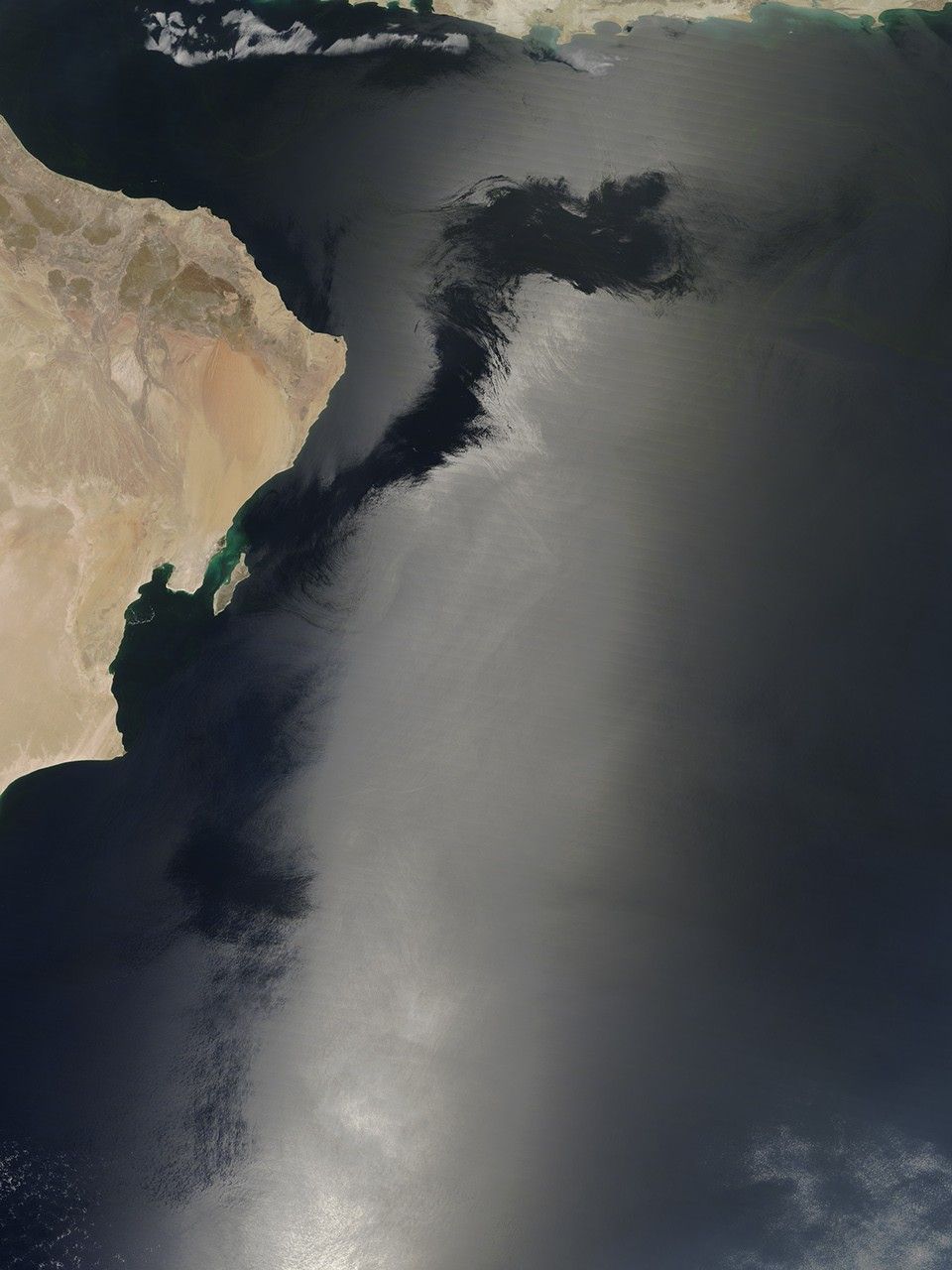
1. Find the dark band in the silvery sea
In the main image of the waters off Oman, look for the broad silvery area first. A winding dark band cuts across it. Two parts of the same sea look so different because different amounts of reflected light reached the satellite. The MODIS instrument aboard NASA's Terra satellite captured this natural-color image on April 11, 2017. NASA Earth Observatory published it on April 30 of the same year. When considering the wind and the state of the water, use April 11 as the observation date.
Look back and forth between the dark band and the silvery water right next to it. This is a different boundary from the one between land and sea. Both areas are on the water, and the boundary curves repeatedly. Once you separate the edges of the land from the edges of the reflection, you can ask why neighboring patches of sea look so different at the same moment. Start with the direction in which the surface bounced the sunlight, before considering the color of the water. Compare nearby patches within the same image. Across opposite ends of the frame, the satellite may also be looking at the surface from different angles.
2. When sunlight reflects toward the sensor
Think of a flat stretch of water as a mirror. The direction of the incoming sunlight determines which way it is reflected. Measured from a line perpendicular to the surface, the angle of incidence equals the angle of reflection. When the satellite sensor lies in the path of the reflected light, the sea looks bright. The glare that reaches a sensor or your eyes after sunlight reflects off the water is called sunglint. Change your viewing position and you may see the glint on another part of the same water.
You can see the same effect in a long glittering path on the water around sunset. Move sideways along the shore and the patch of water that was shining stays where it was. The position and shape of the glints change with your new viewpoint. If the water were a single flat mirror, the Sun's reflection would be confined to a small area. A real surface has many little patches tilted at different angles. Those that bounce sunlight toward your eyes or a sensor are scattered over the water, so the light that seems as if it should collect in one spot can spread across a broad band in an image.
3. How wind leaves a dark band
Wind creates ripples and tilts small patches of the surface in different directions. Each patch can reflect light like a mirror, yet the patches send sunlight in different directions. Where flat water would reflect sunlight toward the satellite, ripples can spread that light out and reduce the amount reaching the sensor. NASA identifies the dark interruption of the silvery reflection in this Arabian Sea image as water roughened by the wind.
Trace the edge between the bright and dark areas. It suggests that the surface was unevenly rough across a wide area. The wind itself is invisible in this image. We see its effect in the light reflected by the water. The band does not tell us that the wind followed the same curves or that it was stronger where the band is wider. Checking wind speed or direction requires separate data for the time and place of the observation.
4. A dark patch is not always rougher
First locate the bright reflection in the image. At a point where a flat surface would reflect sunlight away from the sensor, a tilted patch on a wave can redirect sunlight toward it and produce glints. The relative positions of the Sun and the satellite can therefore make rougher water look brighter in some areas. The contrast in the image off Oman cannot simply be applied to images of other seas or dates.
Brightness alone does not pick out a single surface condition. The same feature can show up with different contrast at the middle and edge of a bright band. To compare two images, line up fixed features such as the coast, then check the observation times, viewing angles and positions of the bright reflection. If the reflection shifted, taking the entire difference as a change in the water can give a false picture of what happened at that spot. Nor can the strength of the silver glow be read as a scale for wind speed.
5. Tell image brightness from water color
This is a natural-color image. Visible-light observations produce familiar colors, and the brightness still depends on more than the color of the water. Light emerging from the water and sunlight reflected off the surface as from a mirror can reach the sensor together. A strong reflection makes differences in water color harder to see. For this reason, researchers studying ocean color may correct for sunglint or exclude affected data.
A dark pattern alone cannot establish the depth of the water, whether it is polluted or what it contains. A film on the water and winds in the area can both affect ripples, for instance, and different causes may leave similar patterns of brightness. Check which observations the image provider used to interpret the scene, then consider what else you would need to observe to test another explanation. Investigating pollution and investigating wind call for different data.
6. Separate clues from conclusions in the same image
Back in the main image, you can see the broad silver area and the winding dark band that crosses it. The difference in brightness is visible directly. The physical explanation is that relatively smooth patches reflected sunlight strongly toward the satellite, while wind-ruffled patches sent less reflected light in that direction. Distinguishing the visible contrast from the explanation for it helps you avoid jumping to the same conclusion for every similar-looking image.
Use the same steps when looking at other bodies of water. Find the boundary between land and water, then locate the strongest reflection and the edges where its brightness changes. Check the date, the satellite, how the image was made and the provider's explanation. When comparing dates, track the fixed coastline and the shifting reflection separately. If the coastline stays put but the silver patch moves, start by checking the relative positions of the Sun and the sensor.